bdd-dsl

Metamodels and associated toolings for applying Behaviour-Driven Development (BDD) to test robotic scenarios.
Acceptance Testing Tutorial 1: Scenarios and Variations
This tutorial turns a free-form pick-and-place requirement into a reusable RobBDD scenario template and one concrete test variant. The complete models live in the robbdd_tutorials repository, beside the runnable ROS 2 example.
The result is a validated test specification. The next tutorial adds evidence, evaluation policies, and execution.
The end-to-end test workflow
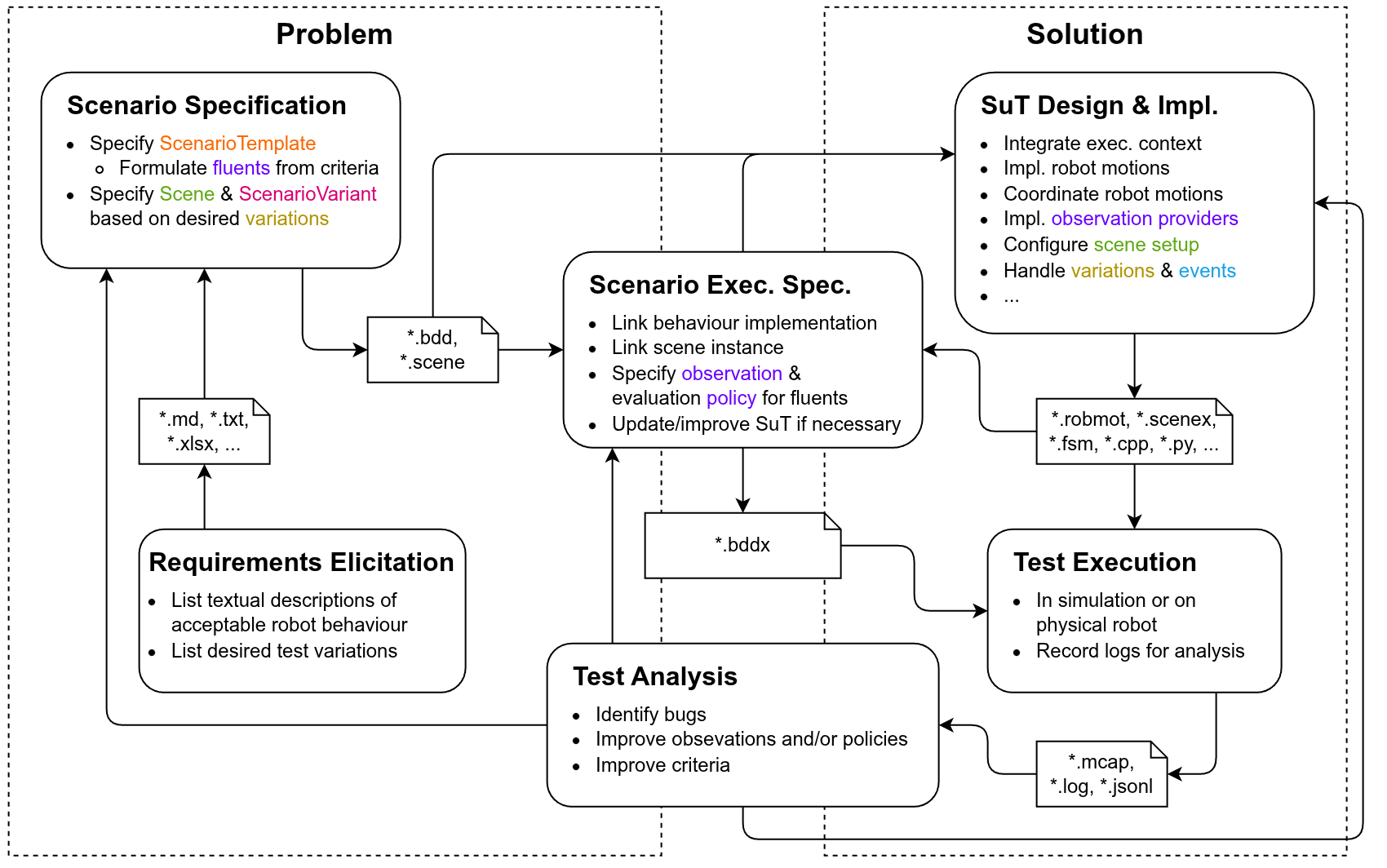
The acceptance-test workflow and its feedback loops.
This tutorial covers the problem-side path from Requirements Elicitation to Scenario Specification.
Its outputs are the simulator-independent .bdd and .scene models.
Tutorial 2 continues with Observation Policy Specification,
connects the models to a concrete system under test, and executes the test.
Test Analysis can then refine the requirements, criteria, observations, or implementation instead of
treating a test verdict as the end of the process.
1. Requirements Elicitation
We start with a typical robotic object-transport task. Its textual requirement might be:
The robot shall move one object from a designated area on a table into a designated bin.
Acceptable object-transport behavior may include the following criteria:
- The target object is present in the table pick area before picking begins.
- The requested behavior completes without error.
- The object is not dropped while being transported from the table to the bin.
- The object is inside the bin after placing completes.
Describe desired test variations
To assess the robustness and reliability of the behavior, a standard practice is testing across relevant variations of the setup. Typical object-transport variations include:
- different target objects;
- different source and destination workspaces, including transport from the bin back to the table; and
- different manipulators.
2. Scenario Specification with RobBDD
Now translate the textual requirements into a RobBDD scenario template.
Start with the behavior
Begin with a minimal template containing the behavior, its variables, and its boundary events.
The scenario itself spans scenario-start to scenario-end; the behavior spans E_PICK_START to E_PLACE_END.
ns tutorial = "https://secorolab.github.io/robbdd/tutorials/pick-place/"
ns pp = "https://secorolab.github.io/models/pick-place-single/fsm/"

Task (ns=tutorial) pick-place-task

Event (ns=tutorial) scenario-start
Event (ns=tutorial) scenario-end
Event (ns=pp) E_PICK_START
Event (ns=pp) E_PLACE_END

Scenario Template (ns=tutorial) pick-place-template {
    duration: from <scenario-start> until <scenario-end>
    task: <pick-place-task>

    var robot
    var target-object
    var place-workspace

    When:
        Behaviour (ns=tutorial) pick-place-behavior {
            duration: from <E_PICK_START> until <E_PLACE_END>
            <robot> picks <target-object> and places at <place-workspace>
        }
}
At this stage, the template describes what the robot does but does not yet encode the acceptance criteria.
Map the criteria to fluent clauses
A fluent clause combines a predicate with the interval over which it must hold.
Criteria 1, 3, and 4 become Given and Then fluent clauses.
Criterion 2 is instead established by the successful result of the behavior action, as
described in Tutorial 2.
Add the intermediate pick/place events, the pick-workspace variable, and the three fluent clauses:
+++ pick_place.bdd
@@
 Event (ns=pp) E_PICK_START
+Event (ns=pp) E_PICK_END
+Event (ns=pp) E_PLACE_START
 Event (ns=pp) E_PLACE_END
@@
     var robot
     var target-object
+    var pick-workspace
     var place-workspace

+    Given:
+        object-at-pick: holds(
+            <target-object> is located at <pick-workspace>,
+            before <E_PICK_START>
+        )
+
     When:
         Behaviour (ns=tutorial) pick-place-behavior {
             duration: from <E_PICK_START> until <E_PLACE_END>
             <robot> picks <target-object> and places at <place-workspace>
         }
+
+    Then:
+        (
+            object-held: holds(
+                pred(
+                    '"{rob}" does not drop "{obj}"',
+                    rob=<robot>, obj=<target-object>
+                ),
+                from <E_PICK_END> until <E_PLACE_START>
+            )
+            and
+            object-at-place: holds(
+                <target-object> is located at <place-workspace>,
+                after <E_PLACE_END>
+            )
+        )
 }
object-at-pick and object-at-place use the built-in location relation.
object-held uses pred(...), which maps arguments in a generic predicate
string to the corresponding scenario variables.
Together, the event-based time constraints define when each criterion
should be evaluated:
E_PICK_START -> E_PICK_END -> E_PLACE_START -> E_PLACE_END
See the complete BDD model.
3. Describe the scene
The scene defines the abstract entities that variations may bind, independent of an execution context, e.g. in simulation or on a physical robot. Consider a scenario where the robot should pick up household objects, such as those in the YCB dataset, from a table and put them in a bin.
obj set (ns=pps_env) pickplace_objects {
    object cube,
    object can,
    object cereal-box,
    object bottle
}

obj set (ns=pps_env) ws_objects {
    object table,
    object bin
}

ws set (ns=pps_env) pickplace_workspaces {
    workspace table-ws,
    workspace bin-ws
}

agn set (ns=pps_agn) pickplace_agents {
    agent arm1,
    agent gripper1
}

comp (ns=pps_env) bin-composition
    of ws <pickplace_workspaces.bin-ws>
{
    obj <ws_objects.bin>
}

comp (ns=pps_env) table-composition
    of ws <pickplace_workspaces.table-ws>
{
    obj <ws_objects.table>
    ws comp <bin-composition>
}

scene (ns=pps_scene) pick_place_scene {
    obj set <pickplace_objects>
    ws comp <table-composition>
    agn set <pickplace_agents>
}
Workspace compositions describe abstract relationships between workspaces. In the scene above, the bin workspace is associated with the table workspace to represent that the bin sits on the table. This association allows a robot behavior expressed relative to one workspace to be related to the other. For example, approaching the table can also be understood as approaching the bin, and vice versa.
See the complete Scene model.
4. Bind a scenario variant
A table variation binds every template variable to an entity from the scene:
Scenario nominal-pick-place {
    template: <pick-place-template>
    scene: <pick_place_scene>

    variation:
    | <pick-place-template.target-object> | <pick-place-template.pick-workspace> | <pick-place-template.place-workspace> | <pick-place-template.robot> |
    |---|
    | <pickplace_objects.cube> | <pickplace_workspaces.table-ws> | <pickplace_workspaces.bin-ws> | <pickplace_agents.arm1> |
}
The template describes what must hold. The variant chooses which robot, object, and workspaces participate in this run. For more expressive variation syntax, including Cartesian products of candidate values, see Cartesian product variation in the RobBDD Specification Tutorial.
Validate the models
From the common model directory:
textx check pick_place_single.scene
textx check pick_place.bdd
Both commands must report OK.
Continue with: