DSL concepts
This page covers the complete .robmot authoring surface. Scene topology and FSM
syntax live in their respective DSLs; a motion model imports and references them.
Model composition
A model contains imports, namespace declarations, and one or more top-level specifications:
import "task.fsm"
import "task.scenex"

ns app = "https://example.org/task/"
ns task = "https://example.org/task/fsm/"
The top-level specifications are:
exec-context: scene, platform, and control period;context: reusable world and specification quantities;tolerances: model-wide satisfaction bands, one per quantity kind (see Constraint relations);ros: the topics, subscriptions, and actions a model talks to (see ROS topics);guarded-motion: context pluswhen,while, anduntilconstraints;constraint-handler: monitors, controllers, and solvers for one motion.
Names become RDF identifiers under the declared namespace. Angle brackets refer
to named model elements, for example <shared.spec.speed> or
<kinova.base_link.base_link_origin>.
Because a name is appended directly to its namespace, the declared URI must be
absolute and must end with / or #; it cannot carry a query or a fragment
name, and its path cannot contain an empty segment. "https://example.org/task"
would mint https://example.org/taskspeed, and "https://example.org//task/"
would mint an IRI with an empty segment, so both are rejected when the model is
validated.
Execution context
Exactly which scene and backend a model runs against is explicit:
exec-context (ns=app) task-exec {
    runs-scene: <task_scene_mjc>
    platform: simulation { name: "MuJoCo" }
    config: "robot.toml"
    timestep: 1.0 ms
}
platform is simulation { name: STRING } or real-world, optionally with a
{ <agent> realized by DEVICE, ... } block binding scene agents to hardware kinds
(KinovaGen3, KinovaGen3-2F85, Robotiq2F85, RobotiqFT300s). config is an
optional path to the deployment TOML a real-world run reads addresses and poses
from; timestep must be positive.
Context scopes
Context gives constraints typed inputs and separates observations from authored, captured, and resulting values.
Scope |
Purpose |
|---|---|
|
Runtime observations from the scene |
|
Values captured or required before a motion |
|
Goals, gains, thresholds, trajectories, and generated references |
|
Values produced or asserted after a motion |
A top-level context is reusable. A motion or handler can declare local context or
alias a declaration with <shared.spec>.
World quantities
World quantities are pose, velocity-twist, wrench, joint-position,
joint-velocity, or joint-force.
Their geometric properties bind them to imported scene elements:
Property |
Target |
|---|---|
|
scene frame |
|
revolute joint |
|
force/torque sensor specification |
world {
    pose tcp-base {
        of: <gripper.g_base.g_pinch>,
        wrt: <kinova.base_link.base_link_origin>,
        as-seen-by: <kinova.base_link.base_link_origin>
    },
    joint-position gripper-pos { joint: <gripper.g_left_driver_joint> }
}
For an ft-sensor wrench, omitting ref-point or as-seen-by defaults that
property to the sensor’s attached frame. Set as-seen-by explicitly when the
force and torque components must be expressed in another frame, such as the robot
base; the runtime transforms the observation before constraints consume its axes.
This sensor binding currently applies to force/torque observations, not RGB or
depth images.
Quantity types
Context quantities support:
geometry:
pose,position,orientation,length,distance,angle,direction,free-vector;motion:
velocity-twist,acceleration-twist,angular-velocity,linear-velocity,linear-acceleration,angular-acceleration,linear-jerk;dynamics:
wrench,force,torque,mass;scalar/control:
dimensionless,duration,path-parameter;generators:
velocity-profile,admittance.
length is the general scalar linear quantity (ISO 80000-3 3-1.1): it may be signed,
so it covers a coordinate or an offset as well as a separation. distance is the
non-negative length between two points. Use length unless the value really cannot be
negative.
Values and references
Scalars and vectors carry units:
length clearance = 0.10 m,
direction normal = (0.0, 0.0, 1.0)
Vectors are always a parenthesized, positional (x, y, z) – never {x: .., y: .., z: ..}.
A direction is what Borghesan et al. (2016) call a versor: a unit, position-free
3-vector – three components, an as-seen-by frame, no anchor and no magnitude (validation
rejects a non-unit direction; magnitudes are separate scalar quantities). The word follows the
Italian versore (unit vector) tradition, not Hamilton’s versor, which is a unit quaternion
– a four-component rotation operator, an unrelated object that shares only the name. Unit
quaternions appear in this DSL too, but as orientation coordinates (quat { xyzw: ... }),
never as directions.
References preserve type and may select a subspace or axis:
<shared.world.tcp-base>.position.z
<shared.world.twist>.linvel.x
<shared.world.external-force>.force.y
A reference is either a named <...> with an optional selector tail, or a bare measure such
as 0.3 s, which is itself a context reference where its type is unambiguous.
Supported view subspaces are position, orientation, linvel, angvel,
linacc, angacc, force, and torque. Every subspace’s axis is x, y, or z; there is
no roll/pitch/yaw selector.
Poses, snapshots, and derived references
A pose combines position and orientation components:
pose goal = {
    position: (0.40, <spec.goal-y>, 0.20) m,
    orientation: euler { axes: xyz extrinsic, angles: (3.14159, 0.0, 1.5708) rad }
}
Position is a (x, y, z) tuple, each element independently a literal or a reference.
Orientation has no direct roll/pitch/yaw literal: it is euler { axes: ..., angles: (...) }
(axes one of the six axis orders, e.g. xyz, optionally extrinsic), a quat { xyzw: (...) },
a direction-cosine { x: ..., y: ..., z: ... }, a plain <...> reference, or a rotation
relative to another orientation (<ref> rotated by ...).
Snapshots sample a world quantity or view. They may carry a trailing arithmetic expression and may resample on an FSM event:
pose start = snapshot of <shared.world.tcp-base>,
length target-x = snapshot of <shared.world.tcp-base>.position.x
                           + <shared.spec.offset>,
pose entered = snapshot of <shared.world.tcp-base> on event <task.E_ENTERED>
A reference value can also be a named reference under a full arithmetic expression – standard precedence, parentheses, mixed operators – not just one repeated operator:
length shifted   = <shared.spec.origin> + <shared.spec.offset>,
force  residual  = <shared.world.ext-force>.force.x - <spec.mass-k> * <shared.world.acc>.linacc.x
See quantity expressions for precedence, dimension-checking rules, and where else (constraint views/thresholds/tolerances, saturation bounds, profile limits, solver gravity) a parenthesized inline expression is accepted.
A value can instead be read from the deployment config at generation time, keyed by a dotted path, taking its type from what the given view resolves to:
pose home-pose = [config.poses.home] for <shared.world.pose-ee-base>
Velocity profiles
A velocity profile limits how a controller approaches a scalar reference:
linear-velocity max-v = 0.08 m/s,
linear-acceleration max-a = 0.30 m/s^2,
linear-jerk max-j = 1.0 m/s^3,
velocity-profile lower-profile = profile {
    max-velocity: <spec.max-v>,
    max-acceleration: <spec.max-a>,
    measured-velocity: <shared.world.twist>.linvel.z,
    max-jerk: <spec.max-j>,
    shape: s-curve
}
Shapes are trapezoidal and s-curve. Maximum velocity and acceleration are
required and positive; jerk and measured velocity are optional. Attach a scalar
reference profile to a controller with profile: <...>. A path-speed profile belongs
to the path driver instead, using moving ... along ... with <profile>.
A profiled controller drives its constraint’s reference as a target rather than tracking it directly: the profile emits a setpoint that approaches the target within the limits, recomputed every cycle, and the controller tracks that setpoint. The measured value it starts from is the constraint’s own quantity, so it is never restated.
Admittance references
Admittance maps measured force to a bounded velocity reference:
admittance comply-x = {
    force: <shared.world.external-force>.force.x,
    mass: 2.0,
    damping: 30.0,
    stiffness: 0.0,
    max-velocity: 0.30 m/s
}
All five parameters are required: there are no implicit controller defaults. Mass and maximum velocity must be positive; damping and stiffness must be non-negative.
Views
A constraint reads one of these view forms:
<shared.world.tcp-base>.position.x
<spec.residual>
(<shared.world.ext-force>.force.x - <spec.mass-k> * <shared.world.acc>.linacc.x)
distance between <shared.world.tcp-base> and <shared.world.object-base>
elapsed
elapsed since <shared.world.pose-object> observed
progress of <shared.world.tcp-base> along <spec.approach-path>
moving <shared.world.tcp-base> along <spec.approach-path> with <spec.approach-profile>
<shared.world.tcp-base>.position on <spec.approach-path>
norm of <shared.world.ext-force>.force
norm of <shared.world.ext-force>.force across <spec.up>
Selectors (.position, .position.x, …) are optional on the first form and determine the
resulting type: a bare quantity like <shared.world.tcp-base> is a pose, .position is a
position, and .position.x is a distance. The same bare-quantity form also names a scalar
context quantity directly (<spec.residual>), and a parenthesized inline expression is
accepted too – see quantity expressions. progress, moving, and on
read against a path context quantity; see Paths for what each of them does.
norm of takes the Euclidean length of a 3-vector view (.force, .torque, .linvel,
.angvel, .position) and has that vector’s kind and unit; a position’s norm is a distance.
across <direction> takes the length of the component perpendicular to a direction context
quantity stated in the same frame as the vector, which is how “force across gravity” is written.
A norm is a measurement: it can be gated and monitored, not commanded.
elapsed since <q> observed measures the run-clock time since the last reading of q landed –
from a subscribers channel or a detect result – and is infinite until the first one, so
less than <validity> reads as “observed within the last validity”: the absolute validity
interval of a real-time datum (Ramamritham, Real-Time Databases, 1993,
doi:10.1007/BF01264051).
Paths
A path is a pose-valued function of a normalized parameter, not a trajectory: it fixes shape and leaves timing free.
\(\mathbf{p}(s)\) is position, \(\mathbf{R}(s)\) is orientation, and \(s\) orders progress along the shape – it is neither time nor necessarily arc length. A trajectory only appears once execution supplies a time law \(s(t)\):
Keeping shape and timing separate follows Bruyninckx, Sections 7.11 and 8.6: runtime motion generation resolves the degrees of freedom the task left unconstrained, rather than the model committing to a timing choice up front.
Path kinds
The DSL provides five path functions:
Kind |
Required fields |
Optional fields |
|---|---|---|
|
|
— |
|
|
— |
|
|
— |
|
|
— |
|
|
|
A path is emitted as a geom-path:Path carrying only its shape parameters; the runtime
evaluates the selected function every control cycle. Figure 6 shows all five,
labeled with the variables their equations below use. \(\operatorname{Rot}(\mathbf{u}, \theta)\) always means “rotate by \(\theta\) around unit axis \(\mathbf{u}\)”, and the
runtime clamps \(s\) to \([0,1]\) before evaluating.

Figure 6 The five path kinds and the variables their equations use, each plotted from its actual closed-form equation below rather than a hand-drawn approximation.
Each subsection below reads the same way: a .robmot excerpt (authored input), a table mapping
each authored field to the symbol its equation uses, then the equation (output). Only the fields
in the table are authored – every other symbol in an equation is computed from them.
Linear interpolation (lerp)
path approach-path = lerp {
    start: <spec.start-pose>,
    goal:  <spec.goal-pose>
}
|
equation symbol |
meaning |
|---|---|---|
|
\((\mathbf{R}_0,\mathbf{p}_0)\) |
pose the path leaves from |
|
\((\mathbf{R}_1,\mathbf{p}_1)\) |
pose the path arrives at |

The straight line between them: position interpolates linearly, orientation follows the shortest rotation from start to goal.
Output: \(\mathbf{p}(s),\mathbf{R}(s)\) – the pose at parameter \(s\), read back by whatever constraint follows this path (see Tangent, position, and orientation constraints below). The rotational term is the same pose-difference operation used elsewhere in the DSL, not component-wise Euler interpolation.
Circle
path orbit-path = circle {
    start:        <spec.start-pose>,
    center:       <spec.center-pose>,
    plane-normal: <spec.plane-normal>
}
|
equation symbol |
meaning |
|---|---|---|
|
\((\mathbf{R}_0,\mathbf{p}_0)\) |
a point on the circle; also the fixed orientation held throughout |
|
\(\mathbf{c}\) |
the circle’s center |
|
\(\mathbf{n}\) |
unit normal of the circle’s plane |
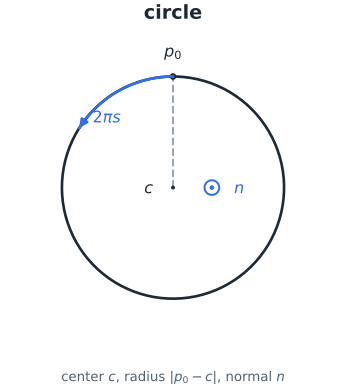
One full revolution around \(\mathbf{c}\), starting and ending at \(\mathbf{p}_0\):
Output: \(\mathbf{p}(s)\) sweeps a circle of radius \(|\mathbf{p}_0-\mathbf{c}|\); \(\mathbf{R}(s)\) stays fixed at the start orientation rather than interpolating.
Arc
path arc-path = arc {
    start:        <spec.start-pose>,
    end:          <spec.end-pose>,
    amplitude:    <spec.arc-height>,
    plane-normal: <spec.path-normal>
}
|
equation symbol |
meaning |
|---|---|---|
|
\((\mathbf{R}_0,\mathbf{p}_0)\) |
pose the arc leaves from |
|
\((\mathbf{R}_1,\mathbf{p}_1)\) |
pose the arc arrives at |
|
\(a\) |
sagitta: bulge height from the chord midpoint \(\mathbf{m}\) to the arc, shown in Figure 6 |
|
\(\mathbf{n}\) |
unit normal of the arc’s plane |

Nothing else here is authored: the chord \(\mathbf{q}\), its length \(\ell\), half-length \(m\), radius \(r\), center \(\mathbf{c}\), and included angle \(\theta\) are all derived from the four fields above.
…then sweeps like the circle, over the included angle instead of a full turn:
Output: \(\mathbf{p}(s)\) sweeps the arc from \(\mathbf{p}_0\) to \(\mathbf{p}_1\); \(\mathbf{R}(s)\) interpolates \(\mathbf{R}_0\) to \(\mathbf{R}_1\) by the identical formula as (3). \(a=\ell/2\) gives a semicircle. A zero chord or non-positive amplitude is degenerate; the runtime holds the start pose instead of dividing by zero.
Helix
path helix-path = helix {
    start:       <spec.start-pose>,
    center:      <spec.center-pose>,
    axis:        <spec.axis>,
    pitch:       <spec.pitch>,
    revolutions: <spec.revolutions>
}
|
equation symbol |
meaning |
|---|---|---|
|
\((\mathbf{R}_0,\mathbf{p}_0)\) |
a point on the helix; also the fixed orientation held throughout |
|
\(\mathbf{c}\) |
center of the swept circle |
|
\(\mathbf{u}\) |
unit axis the helix climbs along |
|
\(h\) |
rise per revolution, along \(\mathbf{u}\) |
|
\(N\) |
number of turns over the whole path |
There is no separate radius field: like the circle, the swept radius is
\(|\mathbf{p}_0-\mathbf{c}|\), fixed by start and center together.

A circle swept along its axis while it turns, so it both revolves and climbs:
Output: \(\mathbf{p}(s)\) completes \(N\) revolutions of radius \(|\mathbf{p}_0-\mathbf{c}|\) around \(\mathbf{c}\), while climbing a total of \(hN\) along \(\mathbf{u}\); \(\mathbf{R}(s)\) stays fixed at the start orientation, as in the circle.
Figure eight
path weave-path = figure8 {
    anchor:       <spec.anchor-pose>,
    radius:       <spec.radius>,
    plane-normal: <spec.plane-normal>,
    form:         gerono
}
|
equation symbol |
meaning |
|---|---|---|
|
\((\mathbf{R}_a,\mathbf{a})\) |
pose both lobes start and finish at |
|
\(r\) |
lobe size |
|
\(\mathbf{n}\) |
unit normal of the figure’s plane |
|
selects the equation |
|

\(\mathbf{u}\) is not a separate field: it is the anchor frame’s own in-plane x-axis, and \(\mathbf{v}=\mathbf{n}\times\mathbf{u}\) completes the frame. Set \(\tau=2\pi s+\pi/2\); both forms start and finish at the anchor:
Output: \(\mathbf{p}(s)\) traces two lobes through the anchor, shaped by whichever form was selected; \(\mathbf{R}(s)\) stays fixed at the anchor orientation.
Projection and the moving path frame
A path knows its geometry as a function of \(s\), but execution only ever measures a position \(\mathbf{p}_{m,k}\) – it does not know \(s\) directly. Each control cycle therefore finds the closest point on the path to what was measured, searching a small window \(\mathcal{W}_k\) around the previous cycle’s answer – sized from how far off the last measurement was – rather than the whole path, so tracking stays on the current branch through a self-intersection instead of jumping to another geometrically close one:
Figure 7 shows the result: the projected point \(\mathbf{p}(s^*)\), the measured point \(\mathbf{p}_m\), and the local frame built at \(\mathbf{p}(s^*)\) that the next section’s three constraints track against.
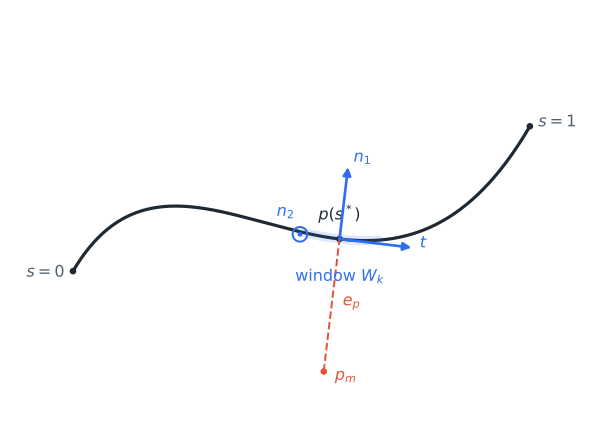
Figure 7 The projected point, the measured position, and the tangent/normal frame built there, computed by running the actual projection, tangent, and frame equations below on an illustrative curve.
The unit tangent \(\mathbf{t}\) is a central difference around \(s^*\), clamped at the path’s endpoints (\(\delta_s=10^{-4}\)):
Two normals complete the frame: \(\mathbf{n}_1\) is parallel-transported from the previous cycle rather than recomputed from scratch, so it does not flip as the curve turns, and \(\mathbf{n}_2\) is simply \(\mathbf{t}\times\mathbf{n}_1\):
At initialization, or at a singularity where the transport is undefined, the runtime picks the world axis least aligned with the tangent instead.
Tangent, position, and orientation constraints
The frame in Figure 7 is what path following actually tracks against. Three ordinary motion constraints, each with one job, together cover all six degrees of freedom:
while {
    follow-tangent: moving <shared.world.tcp-base>
                    along <spec.approach-path> with <spec.approach-profile>,
    follow-position: keeping <shared.world.tcp-base>.position
                     on <spec.approach-path>,
    follow-orientation: keeping <shared.world.tcp-base>.orientation
                        on <spec.approach-path>,
    advance: progress of <shared.world.tcp-base>
             along <spec.approach-path> more than <spec.min-approach-speed>
}
Tangent (
moving ... along ... with ...) drives along \(\mathbf{t}\). Given the measured twist \(\mathbf{V}_m=[\boldsymbol{\omega}_m^{\mathsf T}\; \mathbf{v}_m^{\mathsf T}]^{\mathsf T}\) (Featherstone, Section 2.2), it regulates the along-path speed \(v_{\parallel}=\mathbf{t}^{\mathsf T}\mathbf{v}_m\) toward the profile’s commanded speed. It sets progress and timing but never pulls the TCP toward an endpoint position.Position (
keeping ... .position on ...) regulates the position error \(\mathbf{e}_p=\mathbf{p}(s^*)-\mathbf{p}_m\) – the \(e_p\) in Figure 7 – but contributes only its two lateral components \([\mathbf{n}_1^{\mathsf T}\mathbf{e}_p\;\mathbf{n}_2^{\mathsf T}\mathbf{e}_p]^{\mathsf T}\). It corrects cross-track drift without fighting the tangent controller over speed.Orientation (
keeping ... .orientation on ...) regulates the rotation error \(\mathbf{e}_R=\operatorname{Log}(\mathbf{R}_m^{\mathsf T}\mathbf{R}(s^*))^\vee\) between the measured and path-stored orientation at the same \(s^*\).
One tangential direction, two lateral directions, three angular directions: six independent
controllers, not two competing Cartesian ones. progress of ... along ... only observes
\(v_{\parallel}\) as a guard or monitor – it contributes no solver row. Declare this set
once per moved quantity and path; for multiple arms, repeat it per arm.
Path-speed profile
The velocity profile in moving ... along ... with <profile> is the only authority over path
speed – there is no separate braking speed to configure. Its max-velocity is the cruise speed
\(v_c\); the runtime works out braking on its own by estimating the remaining arc length
with 16 line-segment samples ahead of \(s^*\):
and bounding the target speed so the profile can still stop within that distance at \(a_{\max}\):
Figure 8 compares the two profile shapes this target then feeds. A trapezoidal profile ramps at the acceleration limit alone, one cycle of duration \(\Delta t\) at a time:

Figure 8 Trapezoidal versus S-curve speed, each ramping to the cruise speed and braking from its own actual remaining distance, simulated by running the equations below.
An S-curve profile additionally limits how fast the acceleration itself may change, rounding the corners the trapezoidal profile leaves sharp:
The tangent PID tracks this generated \(v_{k+1}\); position and orientation keep tracking the path geometry throughout, including during acceleration and braking.
References
Herman Bruyninckx, Composable and Explainable Systems of Systems, Sections 7.11, 8.6, and 8.6.3.
Roy Featherstone, Rigid Body Dynamics Algorithms, Section 2.2, doi:10.1007/978-1-4899-7560-7.
Guarded motions
A guarded motion describes what must be true before activation, what is controlled while active, and what can stop or redirect it:
guarded-motion (ns=app) approach {
    description: "Move to the pre-grasp pose"
    context { spec { /* goals and snapshots */ } }
    when all { ready: <shared.world.gripper-pos> equal to <shared.spec.open> }
    while { follow: keeping <shared.world.tcp-base>.position equal to <spec.goal>.position }
    until any { timeout: elapsed greater than 5.0 s }
}
when and until accept any or all. until also supports named nested groups:
until {
    released all {
        x: <shared.world.force>.force.x between -3.0 N and 3.0 N,
        y: <shared.world.force>.force.y between -3.0 N and 3.0 N
    }
}
Constraint names must be unique across all three sections. Prefix a constraint with
@disable to retain it in the source without emitting it. A constraint can alias
another constraint with <motion.constraint>; until groups can also be referenced.
Constraint relations
Relation |
Syntax |
|---|---|
Equality |
|
Greater than |
|
Less than |
|
Inside interval |
|
Outside interval |
|
The view and references must resolve to compatible quantity types and units. Every REF above
also accepts a parenthesized inline expression (outside (0.0 N - <spec.thr>) and <spec.thr>);
see quantity expressions.
A constraint may carry its own tolerance with a trailing within REF:
hold-position: keeping <shared.world.tcp-base>.position
               equal to <spec.goal>.position
               within <shared.spec.satisfied-band>
A constraint that authors no within instead takes the model-wide default for the kind its
error carries, declared once at the top level:
tolerances {
    position:         0.01 m,
    linear-velocity:  0.01 m/s,
    orientation:      5 deg
}
One entry per quantity kind that needs a default; a kind with no entry and no within on the
constraint has no band at all.
Constraint handlers
Each handler names the motion it implements and contains optional local context, optional monitors, controllers, and one or more solvers:
constraint-handler (ns=app) handler-approach {
    handles: <approach>
    monitors { /* FSM wiring */ }
    controllers { /* control laws */ }
    solvers { /* robot algorithms */ }
}
Handlers can alias controllers and solvers from another handler instead of redeclaring them.
Monitors
A monitor observes a constraint, a motion’s complete .when, or its complete
.until. While its motion is scheduled it is in one of two states each cycle:
satisfied or violated. Each state block lists what the monitor does while it is in
that state:
ready: monitor <approach.when> {
    satisfied for 0.3 s { trigger: event <task.E_READY> },
    violated { hold: <home> },
}
trigger fires on entry into the state, and for <Measure> debounces that entry.
hold names a safe fallback motion and belongs in violated; flag, which writes a
boolean the model can read, belongs in satisfied:
contact: monitor <approach.contact> { satisfied { flag: touching } }
Where the when monitor’s event drives no FSM transition, the motion is gated inside its own
runs-in state: the hold motion steps there until the monitor’s satisfied edge, and the event
that edge fires marks the moment the gated motion starts – so it is the event its on event
snapshots should name.
Events may be namespaced FSM events or standalone event names.
publish, declared inside the state block whose condition should drive it (satisfied or
violated, exactly like trigger, hold, and flag), streams the monitor’s verdict onto a
declared ROS topic. A monitor answering a served ROS action instead uses result in the same
position. See ROS topics below for both.
Controllers
Controller kinds are pid, impedance, and feed-forward.
Field |
Use |
|---|---|
|
Controlled constraint; required |
|
Velocity-profile reference |
|
World view used by derivative action |
|
|
|
|
|
PID only: |
|
Required on |
|
Impedance only, at least one of the two required |
as TYPE declares the command quantity where inference is insufficient.
apply at <body> selects the rigid body for a force command. via <solver> selects
a solver explicitly; it may be omitted only when exactly one compatible solver is
available.
Solvers
A solver is authored as one of three closed mechanism families – never a generic algorithm string. Each accepts only its own fields.
Mechanism |
Algorithm |
Role |
|---|---|---|
|
|
Acceleration-level hybrid dynamics over one ordered kinematic chain |
|
|
Recursive Newton-Euler dynamics over one ordered kinematic chain |
|
|
Reconstruct the platform twist from measured wheel/drive velocities |
|
|
Map a desired platform twist to drive/wheel velocity commands (control allocation) |
|
|
Reconstruct the platform wrench from measured wheel/drive forces |
|
|
Map a desired platform wrench to drive/wheel forces (control allocation) |
|
– |
Forward a feed-forward controller’s command directly to a device |
Every solver binds an imported scene agent. A serial-chain entry can declare gravity
and, optionally, a torque limit:
solvers {
    arm-solver: serial-chain {
        agent: <agents.kinova>,
        algorithm: achd,
        limits {
            torque: saturation { max: <shared.spec.max-torque> }
        },
        gravity: (0.0, 0.0, 9.81) m/s^2
    }
}
The only supported solver limit target is torque, and only serial-chain accepts a
limits block at all. Clamping a controller’s output (e.g. a Cartesian acceleration)
is a controller-level concern: use output-saturation on the controller instead.
Gravity may also reference a context quantity.
A mobile-platform entry requires exactly one configuration (the backend lookup
key) and exactly one quantity context reference. The reference’s kind must match the
algorithm’s quantity axis: a velocity-twist for velocity-composition/velocity-distribution,
a wrench for force-composition/force-distribution. The operation axis (composition vs.
distribution) lives in the algorithm token, not a separate field, so no combination is
representable as illegal state:
solvers {
    platform-velocity: mobile-platform {
        agent: <agents.platform>,
        algorithm: velocity-composition,
        configuration: "hddc2b_example_vel",
        quantity: <world.platform-twist>
    },
    platform-force: mobile-platform {
        agent: <agents.platform>,
        algorithm: force-distribution,
        configuration: "hddc2b_example_frc_sc1",
        quantity: <world.platform-wrench>
    }
}
command-forwarding takes only an agent – it is neither a dynamics solver nor a
platform kinematics/control-allocation solver:
solvers {
    gripper-solver: command-forwarding { agent: <agents.gripper> }
}
ROS topics
A model declares everything it talks to over ROS once, at the top level, in one ros block.
Each of its five groups – publishers, subscribers, action-clients, action-servers,
and always – is its own scope, so an entry is referred to by what it is,
<ros.publishers.table-anchor-pose>, rather than by the namespace it happens to mint IRIs in:
ros (ns=app) {
    publishers {
        table-anchor-pose: topic "/table_anchor_pose" message "geometry_msgs/msg/PoseStamped",
    },
    subscribers {
        table-anchor: topic "/recognized_objects" message "vision_msgs/msg/Detection3DArray" {
            observes { <shared.world.pose-table-anchor-cam> }
            pose from results
        },
    },
    action-servers {
        collab-bhv: action "/bdd/collab_bhv_server" type "control_msgs/action/GripperCommand" {
            on-goal: produce event <collab-coord.E_GOAL>,
        },
    },
    always {
        publish at 10.0 Hz to <ros.publishers.table-anchor-pose>
                with <shared.world.pose-table-anchor-cam>,
    },
}
All five groups are optional, and a model declares only the ones it needs.
Publishing from a monitor
A publish belongs to a monitor’s state block (satisfied or violated), and states the
fields it writes:
done: monitor <approach.reached> {
    satisfied {
        trigger: event <task.E_DONE>,
        publish: to <ros.publishers.approach-done> { trinary.value: TRUE },
    },
    violated { publish: to <ros.publishers.approach-done> { trinary.value: FALSE } },
}
A field path is the dot-joined member path of the message. A value is a bare constant the
message class defines (TRUE), a quoted string, or a number; a string field takes a quoted
string, a numeric field a number. When the message type has exactly one payload field left
after the auto-filled ones are set aside, the sugar publish: <value> to <topic> names the
value alone and the field is resolved at generation:
satisfied { publish: TRUE to <ros.publishers.approach-done> },
A third form fires one or more FSM events as the message instead of naming fields directly:
satisfied { publish: events { <task.E_PICK_END> } to <ros.publishers.bdd-events> },
A publish is live only while its state holds, and only while the monitor’s motion is scheduled: every control cycle in that state, the block’s fields are written and the message goes out. A state with no publish sends nothing, so a satisfied-only publish is a signal that appears at satisfaction and is silent otherwise. While the motion is unscheduled the monitor says nothing at all, and a subscriber reads that silence as “not being evaluated” – so it stays distinguishable from an evaluated false without a third published value.
Any message type works, as long as every authored path is one of its payload fields.
Timestamps and the scenario_context_id UUID are filled by the node, never authored: the
clock supplies the stamp, and the scenario_context_id node parameter supplies the scenario,
live-settable with ros2 param set while the controller runs.
A monitor publishes on at most one topic; a second topic is a second monitor, and a state block publishes at most once.
A satisfied publish holds under the constraint the monitor watches; a violated publish
states no condition at all – it is the otherwise, taken while the monitor evaluates and its
constraint does not hold. Any monitor may publish on violated, including one watching a whole
until/when section, but only alongside a satisfied publish: without the case it is
otherwise to, “otherwise” is not “violated”.
Answering a served action
action-servers declares an action this model’s own FSM serves; on-goal is the only field –
a new goal produces the named event and nothing else is authored on the server itself:
action-servers {
    collab-bhv: action "/bdd/collab_bhv_server" type "control_msgs/action/GripperCommand" {
        on-goal: produce event <collab-coord.E_GOAL>,
    },
}
A monitor answers that goal with result, in the same position as publish inside a
satisfied or violated state block:
mon-opened: monitor <hold-close.until> {
    satisfied {
        trigger: event <collab-coord.E_OBJ_GRASPED>,
        publish: events { <collab-coord.E_PICK_END> } to <ros.publishers.bdd-events>,
        result: succeeded <ros.action-servers.collab-bhv> { result.trinary.value: TRUE }
    },
}
A monitor may publish and result in the same state – they answer different things. Only
succeeded and aborted are authorable outcomes: a cancel is the client’s to ask for, and a
goal whose cancel is accepted is always reported CANCELED, whatever the model states. A run
that ends without an authored answer – shutdown, or reaching the FSM end state with no
result – aborts with the result type’s own defaults; the FSM end: state itself answers
nothing, it only ends the loop. At most one monitor answers a given action.
Subscribing and detecting
subscribers reads a topic into a world quantity. observes names the quantities the message
updates, and pose from says which message field carries the pose (results above is the
detection array’s own field name, not a model-authored one):
subscribers {
    table-anchor: topic "/recognized_objects" message "vision_msgs/msg/Detection3DArray" {
        observes { <shared.world.pose-table-anchor-cam> }
        pose from results
    },
}
action-clients declares an action this model calls out to, for detect ... using <action> to
drive:
action-clients {
    find-table: action "/perception/find_table" type "vision_msgs/action/Detect3D",
}
locate: detect <table.anchor_frame> using <ros.action-clients.find-table>
Standing publications
always publishes independent of any monitor, at a fixed rate, for as long as the model runs.
with <quantity> reports one world quantity whole; with { <subject>: <quantity>, ... } tags
each entry when the message carries more than one:
always {
    publish at 10.0 Hz to <ros.publishers.table-anchor-pose>
            with <shared.world.pose-table-anchor-cam>,
    publish at 10.0 Hz to <ros.publishers.seen-objects> with {
        <world_tree.robot-table-body>: <shared.world.pose-table-anchor-cam>,
    },
}
Joint states
The deployment, not the model, decides whether joint states are published. The section’s presence in the platform config turns the publisher on:
[ros.joint_states]
topic = "/joint_states"   # optional, default shown
rate = 100.0              # Hz, optional; omitted publishes every control cycle
One sensor_msgs/msg/JointState reports every chain joint the model drives, under its
runtime-qualified name. The topic and rate are read at launch, so retuning either needs
no regeneration.
Scene and FSM integration
The scene defines bodies, frames, joints, sensors, agents, asset mappings, and scene
instances. A .robmot model consumes those semantic identities; it does not use
MuJoCo names directly. Multiple instances of one kinematic tree remain distinct
through their instance names and generated runtime prefixes.
A scene may give a position as xyz: sample <distrib> m instead of numbers. The
controller draws it once at startup, seeded from [sampling] seed, and records the
draw in the frame log and the run’s provenance. Two positions can be drawn: a frame
on a body, which scene-dsl leaves unplaced, and the placing pose of a free scene
object, stated against a frame placed by numbers. A reset returns the object to the
same draw. Robots, cameras, the base frame and orientations cannot be drawn.
The FSM owns states, events, transitions, and reactions. Motion monitors emit those events, and the generated controller runs only the handler associated with the current FSM state. Event-triggered snapshots are sampled when their named event is received: a shared-context snapshot naming an event is sampled by whichever motion reading it is active on that tick, and one naming none is latched once for the run.
Units
Authored unit spellings are deliberately compact; every exponentiated unit uses ^, never a
bare digit:
rad/s^2, rad/s, deg/s^2, deg/s, m/s^3, m/s^2, m/s, cm/s, Nm, N, rad, deg,
mm, cm, m, ms, s, Hz, kg, and 1.
The generated RDF uses the corresponding QUDT terms.
Generated outputs
motion-spec gen creates one self-contained generation:
Directory |
Contents |
|---|---|
|
Snapshot of authored DSL inputs |
|
JSON-LD graphs, FSM artifacts, and IR |
|
Generated C++ and CMake project |
|
Runtime schema, frame layout, and log protocol |
|
DSL, coordinate and motion-spec provenance, one named graph each |
|
what IR generation derived, and from what |
|
Reusable compiled controller |
|
Runtime logs, REC graph, and consumer manifest |
JSON-LD files use the .ld.json suffix. RDF data is handled as RDF graphs, not as
application-specific JSON objects.